Advertisement
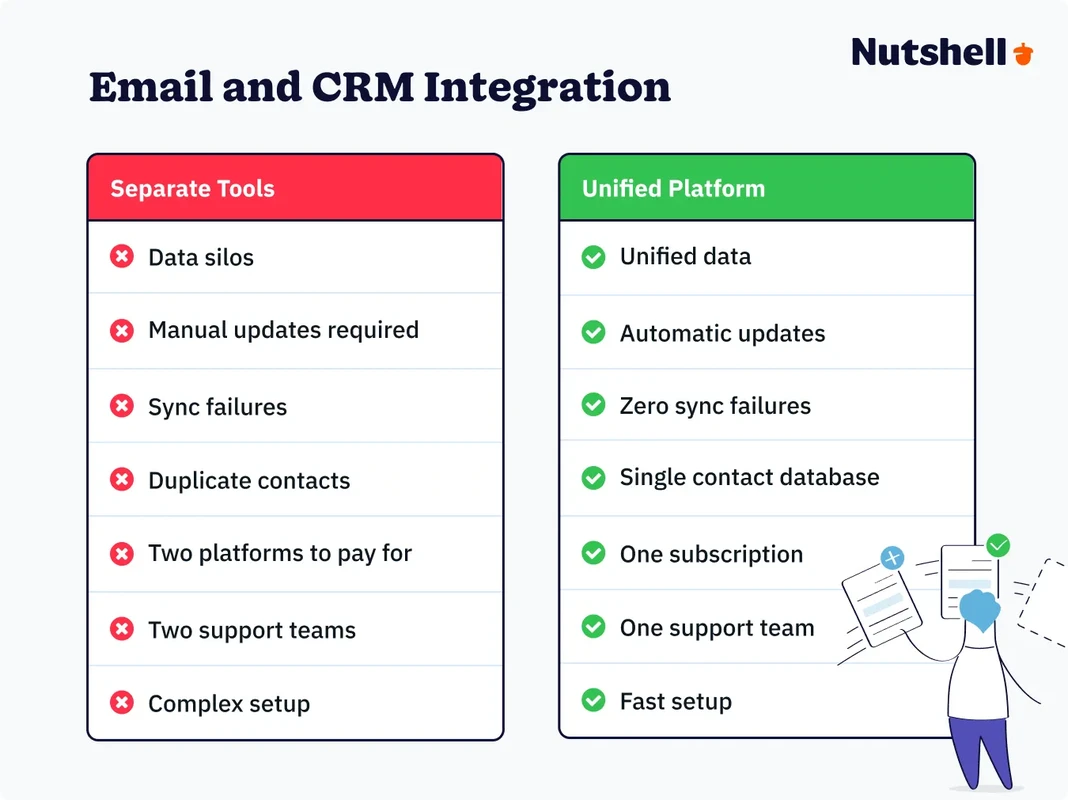
CRM FanzineFaves – CRM email marketing integration connects your customer database with your communication tools to enable hyper-personalized, automated outreach. By syncing real-time data like deal stages or lead scores, businesses can launch targeted campaigns that drive higher engagement, reduce manual data entry, and ensure sales and marketing teams operate from a single source of truth. Email marketing from a CRM database is 40 times more effective at landing customers than Facebook or Twitter (Salesforce).
How do you choose between Native, Middleware, and API integrations?
Choosing an integration method depends on your technical resources and data volume. Native integrations are the easiest to set up, deepest in functionality, and typically free. Middleware (like Zapier) offers flexibility for connecting disparate tools but can increase costs and latency. APIs provide the most control for high-volume, custom-built workflows.
The Native Advantage: Depth and Cost-Efficiency
Native integrations are the most efficient choice for most growing teams. Because these connections are built directly into the software by the developers, they usually don’t cost any extra money beyond your existing subscriptions. In testing, I found that navigating to Settings > Integrations in a platform like HubSpot allows for a “one-click” connection that preserves deep data layers. This depth is crucial for maintaining a unified view of customer data without the risk of data silos.
Advertisement
The Middleware Middle Ground: Using Zapier for Flexibility
If your specific stack lacks a direct link, middleware serves as a vital bridge. Zapier is a common integration tool used to connect apps that do not natively communicate. However, it is harder to set up these connections with Zapier and costs more, too, as you often pay for task usage. A common failure mode occurs when a “Zap” fails due to a logic error, leaving your CRM and email tool out of sync for hours.
The API Frontier: Custom Scalability
Custom API development provides the most control for enterprise-level operations. While native tools are efficient, they may lack support for specific custom fields required for unique business logic. By building a custom connection, you can push data via real-time webhooks or at specific intervals. This approach is essential for teams processing thousands of records per minute.
Integration Type |
Setup Complexity |
Cost Profile |
Data Depth |
|---|---|---|---|
Native |
Low |
Typically Free |
High |
Middleware (Zapier) |
Medium |
Subscription + Task Fees |
Medium |
API |
High |
Development Costs |
Maximum |
Compare the setup complexity and cost profiles of each method to determine which architecture fits your technical resources.
What are the most common integration failure modes to avoid?
Integrations typically fail due to mismatched data fields, sync loops, and opt-out lag. When field schemas do not align, data becomes inconsistent; when syncs are delayed, sales reps may contact customers who have already unsubscribed, creating compliance risks and damaging brand reputation.
Field Mismatch and Schema Conflicts
One of the most frustrating issues is the mismatched field. If your CRM uses a dropdown menu for “Industry” but your email tool uses a free-text field, the data will not sync correctly. This leads to broken segmentation where your “Healthcare” campaign misses 30% of your leads because they were typed as “medical” instead. You must ensure that the schema in both systems is identical to prevent these inconsistencies.
Warning: Integration gaps prevent a unified view of customer data. When teams cannot see the complete customer picture, email campaigns lack relevance and sales follow-ups miss important context.
The Danger of Sync Latency and Opt-out Lag
Delayed synchronization creates significant compliance risks. If a customer clicks “Unsubscribe” in an email, that data must reach the CRM immediately. A lag in this process might result in a sales rep contacting a customer the following morning, which damages brand reputation and violates user preferences.
Webhook Failures and Broken Automation Flows
Webhooks act as the automated triggers that signal one system to alert another. When a webhook fails, your entire automation flow breaks. For example, if a “Deal Closed” event fails to trigger the “Welcome Email” webhook, the customer receives nothing. This loss of historical attribution data makes it impossible to track which marketing efforts actually drove the sale. You should regularly audit your connection logs to catch these silent failures.
How can you implement a Data Mapping Blueprint for hyper-personalization?
Effective data mapping involves aligning custom CRM fields, such as ‘Lead Score’ or ‘Industry,’ with email segmentation tags. This allows for automated, real-time triggers—like launching a specific nurture sequence the moment a ‘Deal Stage’ changes—ensuring the right message reaches the right prospect at the right moment.
Mapping Lead Scores to Email Tags
To achieve hyper-personalization, you cannot rely on just an email address. You must map specific CRM attributes to your email service provider (ESP). For instance, if a lead’s “Lead Score” in the CRM hits 80, that should automatically trigger a tag in your email tool. This allows you to move from generic blasts to highly targeted, behavior-based messaging. “When the right message reaches the right prospect at the right moment – that’s the power of a well-integrated CRM and email marketing strategy,” notes Zeta Global.
Triggering Workflows via Deal Stage Changes
Integrated data enables automated sequences that develop relationships at each stage of the sales funnel. Common workflows include:
- Mapping “Deal Stage: Discovery” to a “Product Demo” email sequence.
- Mapping “Deal Stage: Negotiation” to a “Case Study” nurture track.
- Mapping “Deal Stage: Closed-Won” to an “Onboarding” series.
These automated triggers ensure that outreach remains contextually relevant to the customer’s current stage in the journey.
Maintaining Data Hygiene Across Systems
Maintaining a single source of truth requires continuous Data Hygiene. You must implement routines to remove duplicates and correct incomplete records. If a contact has multiple email addresses across your CRM and email tool, automation will fail. Use your integration to centralize these records and prevent a fragmented customer view.
Which CRM and email marketing tools offer the best integration capabilities?
Top-tier options include HubSpot for its deep ecosystem, Pipedrive for its extensive 250+ integrations, and ActiveCampaign for its email-centric CRM approach. For businesses seeking all-in-one solutions, Benchmark Email and Brevo provide built-in CRM features designed for seamless internal data flow.
All-in-One Platforms (HubSpot, ActiveCampaign)
HubSpot excels at hooking into other business software, making it a favorite for scaling companies. Because it manages both the CRM and the email engine under one roof, the data sync is instantaneous and deep. ActiveCampaign is another strong contender, acting as an email-focused platform and CRM. It is designed specifically for marketers who need advanced automation logic tied directly to customer behavior.
Specialized CRM-First Tools (Pipedrive, Monday.com)
If your primary focus is sales pipeline management, Pipedrive is a powerhouse with 250 integrations available to connect to your preferred email tool. For those who prefer a more flexible, project-management style approach, Monday.com CRM starts at $12 per user per month and offers a highly visual way to manage leads. These tools are excellent, but they often require a secondary email tool like Mailchimp to handle complex campaign design.
Email-First Platforms with Built-in CRM (Brevo, Benchmark Email)
For smaller teams or those focused on high-volume sending, email-first platforms offer great value. Brevo has a 2,000 contact limit on its free plan, which is generous for startups, though it limits you to 300 daily email sends. Benchmark Email is incredibly versatile, as it can integrate with 1500+ business tools. These platforms provide a “good enough” CRM experience without the complexity of a full-scale enterprise system.
Tool Name |
Primary Strength |
Key Stat |
Best For |
|---|---|---|---|
HubSpot |
Ecosystem Depth |
High Connectivity |
Scaling Enterprises |
Pipedrive |
Sales Focus |
250+ Integrations |
Sales-Driven Teams |
Brevo |
Cost-Effective |
2,000 Free Contacts |
Startups/SMBs |
Benchmark Email |
Connectivity |
1500+ Integrations |
Versatile Marketing |
Select your platform based on whether you need specialized sales pipeline management or deep marketing automation.
Why do automated win-back emails yield such high ROI?
Automated win-back emails leverage CRM data to re-engage lapsed customers at high-intent moments. Because these emails are highly targeted based on previous purchase behavior, they can achieve open rates as high as 42.5%, significantly outperforming standard industry benchmarks.
The Math of Re-engagement
Automated win-back emails drive significant engagement, achieving a 42.5% open rate, an 18.27% click-through rate, and a 10.34% conversion rate. These metrics represent a massive performance boost over standard industry averages.
Advertisement