Advertisement
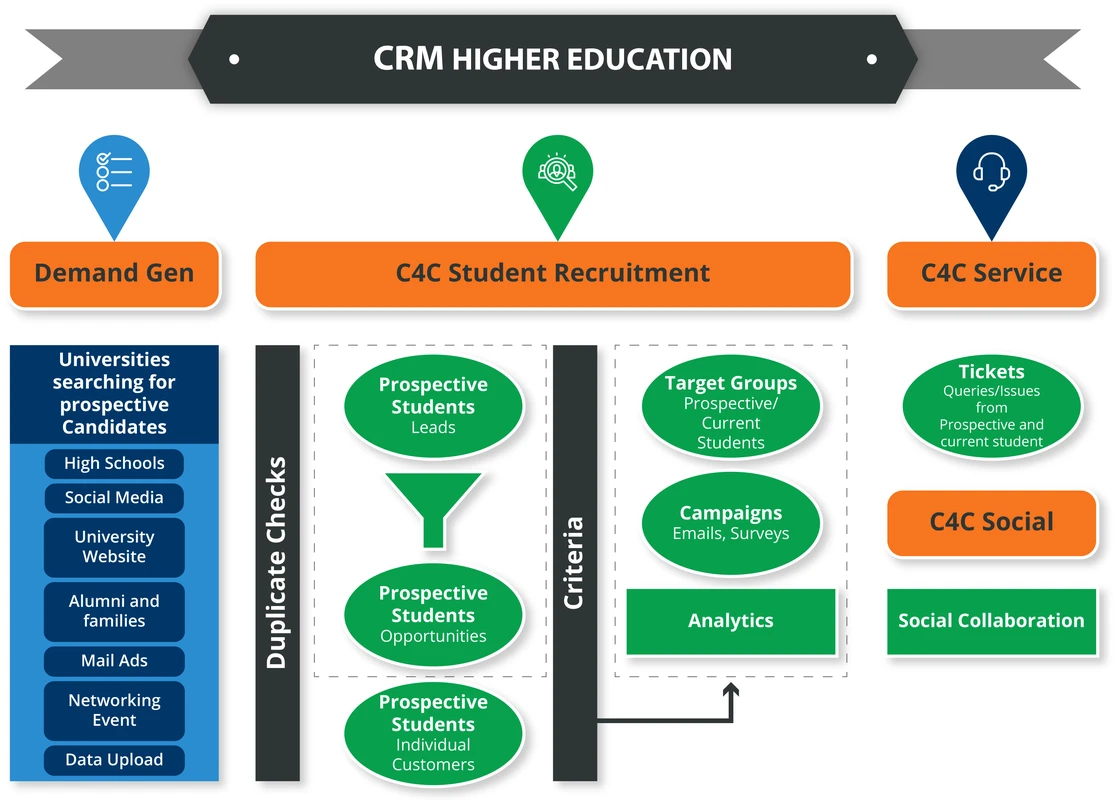
CRM FanzineFaves – A CRM for education and universities is a centralized platform designed to manage the entire student lifecycle, from initial inquiry and admissions to retention and alumni engagement. By breaking down data silos, these systems provide a 360-degree view of students, improving retention rates by an average of 6.8% and boosting staff productivity by up to 18%.
Implementing a CRM can lead to massive financial shifts, such as CityDance saving $100K within their first year of use. This level of efficiency is possible when institutions move away from manual enquiry handling and disconnected databases.
Why do university CRM implementations often fail?
University CRM implementations typically fail due to three primary factors: poor data integrity during migration, low user adoption among faculty and staff, and integration lag between the CRM and the existing Student Information System (SIS). Without addressing these, institutions risk creating new data silos rather than eliminating them.
Advertisement
The Data Integrity Trap
Many institutions attempt to migrate legacy data without cleaning it first, which leads to fragmented outreach and unreliable workflows. If an admissions officer pulls a report and finds duplicate entries or outdated contact details, the entire system loses credibility. This failure mode often occurs when communication tools, such as SMS platforms, are not properly integrated into the core CRM strategy, causing automated triggers to fail or send incorrect information to prospective students.
Overcoming Faculty Resistance and User Adoption
Low user adoption is a silent killer of ROI. While a system might be technically sound, it is useless if faculty members refuse to log interactions. Interestingly, achieving high adoption is possible; for instance, SKILLS2WORK achieved 100% user adoption by utilizing Zoho CRM Canvas to customize the interface. When the UI feels intuitive and specific to their workflow, resistance drops. “Helping administrators envision these opportunities and reframe their thinking on traditional operations was an important element to our modernization plan,” noted Anderson regarding institutional modernization.
The ‘Shadow IT’ Risk: Preventing Departmental Micro-CRMs
When a central CRM is too difficult to use, departments often revert to “Shadow IT”—using independent spreadsheets or small-scale tools like Trello to manage their own students. This creates new silos. To prevent this, the central platform must offer enough flexibility to serve diverse needs, from marketing to academic advising, without requiring every user to become a developer.
How do you calculate the Total Cost of Ownership (TCO)?
Total Cost of Ownership for an education CRM extends far beyond the initial licensing fee (which can start as low as $15/month). Real costs include integration middleware, API call volumes, dedicated CRM administrators, and specialized consultants required for complex SIS-to-CRM synchronization.
Hidden Costs: Integration and Administration
Budgeting requires accounting for technical complexities that extend beyond the initial $15/month starting price. To ensure a successful rollout, institutions must invest in:
- Integration middleware to bridge the gap between disparate databases.
- API call volumes that can increase costs as your student engagement scales.
- The salary of a dedicated CRM administrator to manage system updates and user permissions.
- Specialized consultants for initial setup and complex data mapping.
Licensing vs. Long-term Maintenance
While some platforms offer low entry points, the long-term maintenance of a highly customized environment can be substantial. For example, if you are using advanced features like Zoho CRM’s Canvas to create custom forms within forms, you will need staff trained specifically in that interface. Failing to budget for these specialized skills can lead to a system that is technically “active” but functionally stagnant.
What are the best CRM tools for higher education in 2026?
The best CRM software for higher education includes specialized platforms like Slate for admissions, Salesforce Education Cloud for scalability, and Element451 for AI-driven engagement. Choosing the right tool depends on whether your priority is recruitment, student lifecycle management, or alumni relations.
In 2026, there are approximately 16 software options reviewed as top-tier for the sector. The following table compares several leading solutions based on their primary institutional focus.
CRM Name |
Primary Focus |
Key Strength |
Target User |
|---|---|---|---|
Slate CRM |
Admissions & Enrollment |
Highly specialized workflows |
Admissions Officers |
Salesforce Education Cloud |
Full Student Lifecycle |
Massive scalability |
Enterprise Universities |
Element451 |
AI-Powered Engagement |
All-in-one automation |
Student Success Teams |
Zoho CRM |
Customizable Lifecycle |
Cost-effective & flexible |
Small to Mid-sized Colleges |
Ellucian CRM |
Higher Ed Support |
Built for university ecosystems |
Institutional Admin |
Integration strategy is paramount. Institutions should evaluate tools like Lark, which simplifies admissions through smart collaboration, or NetSuite CRM, which provides advanced cloud-based tech solutions for broader institutional management.
Admissions-Focused Solutions
For institutions where recruitment is the primary bottleneck, Slate CRM remains a dominant force. These tools prioritize the “top of the funnel,” ensuring that no inquiry is lost. They focus on lead nurturing and reducing lead leakage through automated follow-ups.
All-in-One Lifecycle Platforms
Platforms like Element451 or Classe365 aim to be the single source of truth. Classe365 is notable because it combines CRM, SIS, and LMS into one unified platform. This reduces the “integration lag” that often plagues universities using separate, disconnected vendors.
Highly Scalable Enterprise Options
Large-scale universities often require the heavy-duty architecture of Salesforce Education Cloud. These systems are designed to handle vast amounts of data and complex, multi-departmental permission structures, ensuring that an Admissions Officer and an Alumni Manager can access the same record without seeing unnecessary sensitive data.
How does a CRM differ from a Student Information System (SIS)?
While an SIS is often the primary platform used to manage and retain student data across campus, a CRM serves a distinct role in driving engagement and recruitment. The CRM acts as the engine for outreach, whereas the SIS remains the system of record for academic data.
Budgeting for both is essential to avoid functional gaps. Administrators must recognize that a CRM and an SIS are complementary tools that serve different institutional needs.
Feature/Criterion |
CRM (Customer Relationship Management) |
SIS (Student Information System) |
|---|---|---|
Primary Use |
Engagement, Recruitment, & Retention |
Academic Records & Enrollment |
Users |
Admissions, Marketing, Alumni, Advisors |
Registrars, Faculty, Administration |
Core Features |
Email/SMS, Lead Nurturing, Campaigns |
Grading, Transcripts, Course Scheduling |
User Persona Mapping: Admissions vs. Registrar
An Admissions Officer uses the CRM to track a prospective student’s journey from the first click on an ad to the moment they deposit. They might use a specific menu path like Marketing > Campaign Management > Lead Tracking to monitor conversion rates. Conversely, a Registrar uses the SIS to manage the official transcript and ensure a student has met graduation requirements. The CRM is about the relationship; the SIS is about the record.
Feature Breakdown: Engagement vs. Records
If you want to trigger an SMS to a student who hasn’t completed their financial aid form, you use the CRM. If you need to issue an official degree certificate, you use the SIS. Trying to use a CRM for official grading is a recipe for data integrity failure.
Can automation actually improve student retention and fundraising?
Yes. Automation in CRMs can increase student retention by 6.8% and boost alumni fundraising success by up to 30%. By using predictive behavior triggers—such as prompting career milestones based on credit completion—institutions can move from reactive to proactive support.
Lead Nurturing and Conversion Automation
Automation prevents “lead leakage.” Instead of waiting for a student to call, the CRM can automatically send a series of personalized emails or SMS messages based on preset rules. For example, when a student fills out a specific inquiry form, the system can immediately trigger a “Welcome” sequence. This ensures that the institution remains top-of-mind during the decision-making process.
Predictive Guidance: The Future of Student Success
Modern CRMs allow for “Predictive Behavior” modeling. This means the system can identify at-risk students before they fail. For instance, if a student’s engagement with the student app drops significantly, the CRM can trigger an alert for an academic advisor to intervene. This shift from reactive to proactive support is what drives the 6.8% increase in retention rates.
Alumni Engagement and Fundraising Gains
The student lifecycle does not end at graduation. Using a CRM to manage alumni relations allows for highly targeted fundraising. Rather than sending generic donation requests, institutions can use data to identify alumni who have reached specific career milestones. This precision is why organizations see up to a 30% increase in fundraising success through better engagement strategies.
To ensure your technology stack meets your institutional goals, use this selection framework:
- Identify your team’s goals and priorities (e.g., recruitment vs. retention).
- Assess integration needs and scalability with your current SIS.
- Evaluate how communication tools (like SMS) fit within your CRM strategy.
FAQ
Is a CRM necessary if we already have an SIS?
Yes, because a CRM handles engagement, recruitment, and retention (e.g., SMS/Email), while the SIS is strictly for academic records like grades and transcripts. They serve different purposes and work best when integrated.
How much can a university save by using a CRM?
Savings vary, but case studies like CityDance show up to $100K in savings within the first year through improved efficiency. Other institutions see significant gains in staff productivity and reduced manual labor costs.
What is the impact of CRM on staff productivity?
Research from IBM suggests that education-specific CRMs can improve staff productivity by up to 18%. This is achieved by automating repetitive tasks and providing a centralized view of student data.
Advertisement