Advertisement
CRM FanzineFaves – Choosing between Microsoft Dynamics 365 and Salesforce depends on your ecosystem: Dynamics 365 is ideal for Microsoft-centric organizations seeking integrated ERP/CRM capabilities and predictable TCO, while Salesforce is the premier choice for pure-play CRM depth, massive third-party app ecosystems, and advanced sales pipeline management through its cloud-native architecture.
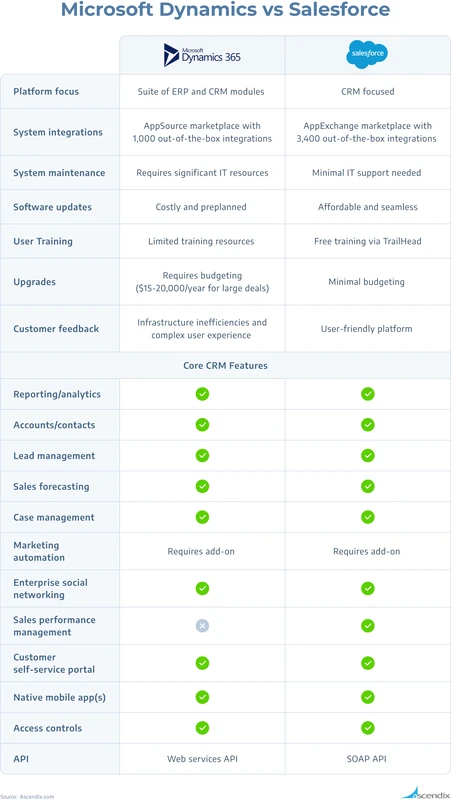
Salesforce’s AppExchange offers a massive marketplace of 7,000 third-party applications, whereas Dynamics 365’s strength lies in its native integration with the Microsoft Power Platform.
What are the hidden costs beyond license fees?
Total Cost of Ownership (TCO) differs significantly: Salesforce often has lower entry-level costs ($25/user/month) but scales aggressively with premium tiers ($500/user/month) and high storage fees ($125/500MB). Dynamics 365 has higher starting prices ($65/user/month) but offers more predictable enterprise scaling and lower storage costs ($40/GB).
Advertisement
The Sticker Price vs. Real-World Scaling
Many procurement officers make the mistake of only looking at the initial quote. While Salesforce Sales Cloud offers a low entry point of $25/user/month, the cost can escalate rapidly as you move toward the $500/user/month upper-end pricing for premium or unlimited tiers. This rapid scaling often catches growing businesses off guard during budget reviews. In contrast, Dynamics 365 Sales starts at a higher baseline of $65/user/month, but its top-end pricing of $162/user/month provides a more controlled ceiling for enterprise-level users.
Budget overruns often stem from the gap between initial quotes and necessary add-ons. A $25 seat can quickly escalate to a $150 seat once essential modules are added. This mismatch between “sticker price” and functional reality is a primary driver of CRM budget volatility.
Storage and API Call Traps
Data management costs are where the two platforms diverge most sharply in terms of technical overhead. Salesforce imposes a significant premium on data, charging approximately $125 for every 500MB of storage. This can lead to a massive monthly bill if your sales team uploads high-resolution contract images or heavy attachments directly to the Lightning interface. Dynamics 365 provides a more economical alternative for data-heavy organizations, with storage costs landing around $40/GB.
Feature |
Salesforce |
Microsoft Dynamics 365 |
|---|---|---|
Entry-Level Pricing |
$25/user/month |
$65/user/month |
Top-End Pricing |
$500/user/month |
$162/user/month |
Storage Cost |
$125/500MB |
$40/GB |
Primary Strength |
CRM Specialization |
ERP/CRM Integration |
Comparing these figures shows that Dynamics 365’s $40/GB storage rate provides a different cost trajectory than Salesforce’s $125/500MB model as data volumes grow.
Why do Dynamics 365 implementations often fail compared to Salesforce?
Implementation failure in Dynamics 365 often stems from a lack of dedicated CRM strategy. Wesley Snow, Co-Founder and President of Ascendix Technologies, warns that “Microsoft is very much an IT-oriented product. It is sold through their IT department and is bundled with all other tools that have nothing to do with CRM.” This approach risks treating the platform as a mere “plug-in” rather than a core sales tool.
The IT-Led Silo Trap
The structural approach to deployment is a critical differentiator. Wesley Snow, Co-Founder and President of Ascendix Technologies, notes that “Microsoft is very much an IT-oriented product. It is sold through their IT department and is bundled with all other tools that have nothing to do with CRM.” This creates a massive risk of failure when organizations attempt to simply “plug in” CRM capabilities to a broad IT bundle without a sales-led strategy. When the IT department dictates the configuration via the admin center, the resulting tool often fails to meet the actual needs of the frontline sales representative.
The Cost of Poor Configuration
While Dynamics faces “plug-in” risks, Salesforce faces the opposite: the danger of over-customization. Because Salesforce is the most popular CRM software in the world, companies often attempt to rebuild their entire business logic within the platform. This leads to “scope creep,” where the system becomes so complex that it is impossible to maintain. In my experience, a poorly configured CRM—whether it is too rigid or too complex—destroys user adoption rates, leading to a total loss of the initial investment.
How do AI capabilities compare: Microsoft Copilot vs. Salesforce Einstein?
Dynamics 365 integrates Microsoft Copilot as a native AI assistant. Salesforce utilizes Einstein AI and the new Agentforce autonomous agents to deliver specialized intelligence.
Native Integration vs. Modular Add-ons
The way AI is delivered defines the user experience for both platforms. Dynamics 365 leverages Microsoft Copilot natively, meaning the AI assistant is woven into the existing workflow without requiring complex secondary configurations. This allows for a more unified experience for users already accustomed to the Microsoft ecosystem. Salesforce, however, approaches AI through a more modular lens. While Einstein AI provides deep insights, achieving the full potential of Salesforce’s AI often requires specific upgrades or the implementation of Agentforce, their new suite of autonomous AI agents.
Evaluate your technical roadmap against these functional differences:
- Microsoft Copilot: Offers native, built-in assistance across the Dynamics 365 suite.
- Salesforce Einstein: Provides highly specialized, deep-learning CRM insights.
- Salesforce Agentforce: Introduces autonomous agents capable of executing complex tasks.
- Integration Style: Dynamics is “AI-first” in its current updates, while Salesforce is “AI-modular.”
The Data Readiness Requirement for AI
A common misconception is that AI works “out of the box” regardless of your data quality. This is false. Whether you use Copilot or Einstein, your AI is only as good as your underlying data schema. If your sales team is not updating lead statuses or contact records, the AI will provide hallucinated or useless insights. To check your AI settings in Salesforce, you typically navigate through Setup > Einstein > Einstein Setup, whereas in Dynamics, you may find AI configurations within the Power Platform admin center.
Which platform wins for customization and ecosystem?
Salesforce offers a specialized CRM ecosystem through its AppExchange marketplace of 7,000+ applications. Dynamics 365 provides deep integration for those utilizing the Microsoft Power Platform.
Shortcut: In Salesforce, use the Global Search bar to quickly find any object or record, or use the Lightning interface navigation to jump between modules.
AppExchange vs. Power Platform
The scale of these ecosystems is vastly different. Salesforce’s AppExchange is a massive marketplace containing over 7,000 third-party applications, allowing businesses to add niche functionality—from specialized billing to advanced marketing automation—with a few clicks. This makes Salesforce incredibly versatile for companies that want to “buy” rather than “build” their solutions. Dynamics 365 takes a different path through the Microsoft Power Platform. Instead of just buying apps, users can build their own custom applications, automations, and BI reports using Power Apps and Power Automate.
The Developer Experience: Apex vs. .NET
The talent you hire will depend on which platform you choose. Salesforce relies heavily on Apex, a proprietary programming language, which requires specialized developers. Dynamics 365 is built on a more traditional stack, making it easier for companies with existing .NET developers to jump in. While Salesforce offers a more specialized pool of CRM experts, Dynamics 365 allows for deeper integration with existing enterprise software development lifecycles.
Is Dynamics 365 better for reporting and ERP integration?
Dynamics 365 is optimized for reporting and unified business processes, functioning as both a CRM and an ERP product suite. Salesforce is a cloud-based CRM platform that uses tools like MuleSoft for enterprise connectivity.
Unified Data: CRM + ERP
Dynamics 365 holds a significant advantage for organizations that need a “single source of truth” across both sales and operations. Because Microsoft offers Dynamics 365 as both a CRM and an ERP product suite, the data flows naturally between your sales pipeline and your finance or supply chain modules. This reduces the need for complex, error-prone data synchronization. In contrast, Salesforce is a cloud-based CRM platform that focuses almost exclusively on the customer relationship, leaving the operational side to other systems.
The Role of MuleSoft in Salesforce Architectures
To bridge the gap between Salesforce and an ERP, companies often must invest in middleware. MuleSoft is a primary integration tool used to connect Salesforce to external enterprise systems. While this allows for a highly customized and powerful architecture, it adds another layer of cost and technical complexity. If you find yourself navigating through Setup > Integration > Connected Apps in Salesforce to manage these links, you are likely dealing with the complexity that a native Dynamics 365 setup avoids. For many, the trade-off is between the specialized depth of Salesforce and the operational unity of Dynamics 365.
FAQ
Can Microsoft Dynamics be used on-premises?
Microsoft Dynamics 365 can be deployed both in the cloud and on-premises, whereas Salesforce is an exclusively cloud-based, highly scalable SaaS platform.
Which platform has a better learning curve?
Salesforce provides dedicated training resources through its Trailhead education network to help users gain proficiency.
How reliable are these platforms?
Both platforms are designed for enterprise-grade reliability, typically maintaining a 99.9% uptime benchmark.
Advertisement