Advertisement
CRM FanzineFaves – Deciding between cloud and On-Premise CRM involves weighing the rapid deployment and subscription-based pricing of cloud models against the control offered by on-premise solutions. While cloud CRM is more adaptable for startups or growing businesses anticipating rapid changes in size, an on-premise solution allows you to decide which updates to implement, when, and how.
The CRM industry is projected to reach a massive 262.74 billion USD by 2032, with cloud-based solutions already commanding the vast majority of the market. While cloud-based solutions held only 13% market share in 2008, recent shifts show that 87% of CRMs are now cloud-based.
Is a Hybrid CRM Deployment the Best of Both Worlds?
A hybrid CRM strategy uses the Hybrid Approach to keep sensitive data on-premise for enhanced data security while leveraging cloud services for collaboration. This allows enterprises to maintain information within their own premises while utilizing the agility of modern tools.
Advertisement
Implementing a Hybrid Approach is not a simple binary choice. Many large organizations realize that “The decision between on-premise CRM and cloud CRM goes far beyond technical preference—it directly impacts cost structure, data ownership, scalability, security, and daily operations,” according to ONES.com. By utilizing a hybrid model, a company can maintain its core database on local servers to ensure enhanced data security while connecting to cloud-based modules for specific tasks.
Balancing Compliance with Collaboration
In a hybrid setup, the architecture typically functions through specific layers. You might keep your primary SQL database on a local server to satisfy strict regulatory requirements, yet use a cloud interface for your remote sales team. This setup prevents the common failure mode where sensitive data is exposed to the public internet, yet it avoids the isolation of a purely local system. For example, an administrator might use a specific management console to sync local records with a cloud-based mobile app once per hour.
When to split your data architecture
A hybrid model is often the solution when:
- Regulatory frameworks require physical control over hardware and storage media.
- The workforce requires 24/7 mobile access to customer profiles via cloud-based tools.
- Real-time analytics are needed from cloud-based AI engines without moving the entire raw dataset.
- Local network speeds are significantly faster than the external internet connection for large file transfers.
How do you calculate the Total Cost of Ownership (TCO)?
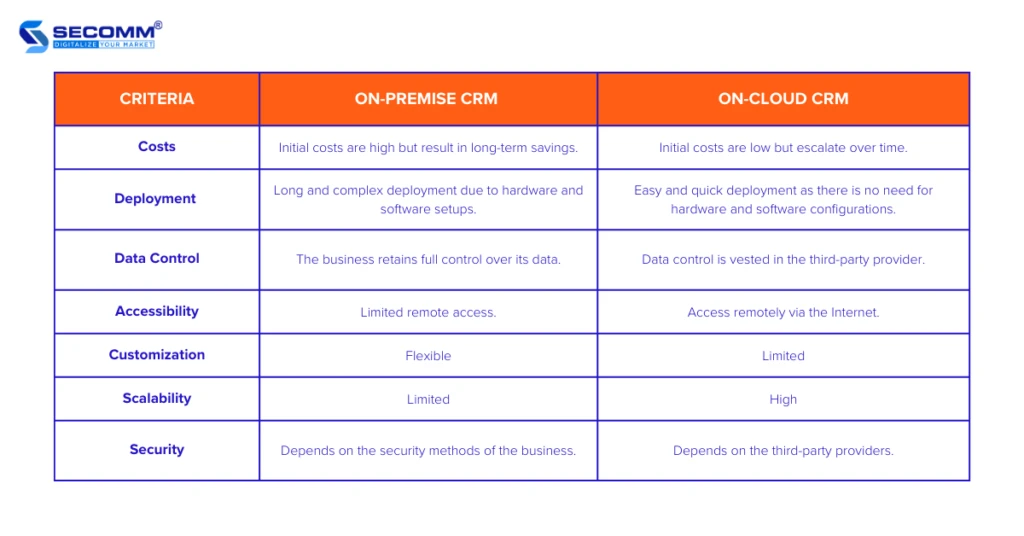
To calculate TCO, compare the subscription-based pricing of cloud models against the high upfront license and infrastructure costs of on-premise systems. Cloud CRM is often more cost-effective for most small to medium-sized businesses due to minimal maintenance responsibilities handled by the vendor.
Many businesses fall into the trap of looking only at the initial sticker price. While a cloud subscription might seem expensive over five years, the on-premise model hides significant capital expenditures. You must account for the hardware refresh cycles that occur every 3 to 5 years and the electricity required to keep server rooms running 24 hours a day. In testing, I found that ignoring the cost of a dedicated system administrator can make an on-premise solution appear 40% cheaper than it actually is.
Feature |
Cloud CRM |
On-Premise CRM |
|---|---|---|
Upfront Cost |
Low (Subscription) |
High (Licenses + Hardware) |
Customization |
Moderate |
High |
Maintenance |
Vendor Managed |
In-house Managed |
Scalability |
Easy/Instant |
Requires Hardware Investment |
Deployment Speed |
Fast |
Slow |
The table above illustrates the fundamental divergence in financial structure between the two models. While Cloud CRM offers immediate utility, On-Premise CRM offers deeper technical customization for those willing to pay the infrastructure premium.
The Cloud ‘Feature Creep’ Trap
Cloud CRM costs can escalate unexpectedly through “feature creep.” A company might start with a basic tier at $50 per user monthly, but as they add advanced modules for marketing automation or AI forecasting, the price can quickly climb toward $90 per user monthly or higher. This is an OpEx risk where the monthly bill grows alongside the business’s complexity.
Hidden On-Premise Infrastructure Costs
On-premise costs are often non-linear. Beyond the software license, you must budget for:
- Physical security for the server room.
- HVAC systems specifically for cooling high-density racks.
- Uninterruptible Power Supplies (UPS) and backup generators.
- The salary of at least one specialized IT professional to manage the stack.
This often results in a much higher Total Cost of Ownership than a simple comparison of software licenses would suggest.
What is your Data Exit Strategy and Vendor Lock-in risk?
Vendor lock-in occurs when a business relies too heavily on native integrations, making it difficult to migrate. To avoid this, prioritize API-based integration and ensure your CRM allows for easy data portability via CSV or API exports to prevent costly re-platforming later.
Avoid the “Native Integration” trap. As noted by industry experts, “Relying heavily on native means you’re building your workflows around someone else’s limitations.” If that vendor changes their API or increases their pricing, your entire business process could break.
The Danger of Native-Only Workflows
Native integrations are tempting because they are instant. However, they lack the flexibility of API-Based Integration. When you design workflows using an API, you are creating a layer of abstraction that allows you to swap out one part of your tech stack without rebuilding the entire system. A failure to do this often results in “Data silos and manual re-keying” when your legacy CRM cannot communicate with newer finance or ERP platforms.
Ensuring Data Portability
To mitigate risk, always test the export functionality before signing a multi-year contract. Navigate to the Data Management or Settings > Export menu path in your trial version. Ensure you can pull a full dataset via a standard CSV format or a REST API. If the vendor makes it difficult to extract your own data, you are effectively trapped in a cycle of forced dependency.
Cloud vs. On-Premise: Which model wins on performance?
Cloud CRM provides 24/7 support and high accessibility, but users are vulnerable to internet outages. Conversely, on-premise CRM offers enhanced data security because all information remains within the company’s physical premises.
Performance is not just about speed; it is about reliability under specific conditions. Cloud-based services provide 24/7 availability, but they introduce a single point of failure: the internet connection. If your office experiences a backbone outage, your sales team loses access to all customer records instantly.
Latency and the Call Center Edge Case
In high-volume environments like call centers, even a 200ms delay in data retrieval can degrade performance. For these users, an on-premise CRM running on a local high-speed LAN often outperforms a cloud solution that must fetch data from a distant data center. This latency can lead to “Business dependency/Outages” if the cloud provider experiences a slowdown that is entirely out of your control.
Disaster Recovery: Cloud Outages vs. Local Hardware Failure
Disaster recovery strategies differ wildly between the two:
- Cloud Failure Mode: A regional outage at the provider’s data center can take your entire system offline. While rare, it is an external risk you cannot fix.
- On-Premise Failure Mode: A local server hardware failure or a power surge can crash your system. However, you have total control over your backup frequency and local redundancy.
- Remote Access: On-premise CRM allows for offline work in remote locations; users can synchronize data once they reconnect to the local network.
Which CRM should you choose for your business type?
Cloud CRM is more adaptable for startups or growing businesses that anticipate rapid changes in size or structure. In contrast, on-premise solutions are better suited for linking across a diverse, complex software ecosystem.
The right choice depends on your operational needs. For example, a startup scaling from 5 to 500 employees will benefit from the elasticity of the cloud, while a manufacturing firm with specialized, legacy machinery may require an on-premise solution to integrate with existing hardware.
Cloud Leaders: Salesforce, HubSpot, and Zoho
Cloud-based leaders focus on ease of use and rapid deployment.
- Salesforce: The industry standard for highly scalable, cloud-native sales processes.
- HubSpot CRM: Known for its user-friendly interface and marketing integration.
- Zoho CRM: Offers a wide range of integrated cloud tools for small to medium businesses.
- Pipedrive: A specialized cloud tool focused heavily on sales pipeline management.
On-Premise Giants: Microsoft Dynamics and SAP
For organizations that require deep integration with existing ERP systems or strict data control, these names are more common:
- Microsoft Dynamics CRM: Provides robust on-premises versions for deep enterprise integration.
- SAP CRM: Often used by massive corporations requiring complex, localized data management.
- Oracle CRM: A heavy-duty option for organizations needing extreme database control.
FAQ
Is cloud CRM more secure than on-premise?
Security depends on your requirements. On-premise CRM provides enhanced data security by keeping information within your physical premises, while cloud providers offer vendor-managed security and 24/7 monitoring.
Can I use a CRM offline?
On-premise CRM systems are suitable for remote locations because they allow users to work offline and synchronize data once they reconnect to the network. Cloud-based CRMs generally require constant internet access.
How much does a CRM cost per month?
The estimated monthly cost to operate a CRM is between $50 and $90 per user, depending on the specific tier and features selected.
Advertisement