Advertisement
CRM FanzineFaves – A CRM for financial advisors is a specialized software platform designed to centralize client data, automate administrative workflows, and manage complex relationships. Unlike general-purpose tools, financial CRMs include critical features like portfolio tracking, compliance reporting, and seamless integrations with planning tools like RightCapital to ensure regulatory adherence and operational efficiency. 78% of respondents suggest that improved communication through better technology could help prevent clients from switching providers.
How do you avoid a ‘Migration Nightmare’ when switching CRMs?
To avoid a migration nightmare, advisors should follow a structured readiness checklist: audit existing data for hygiene, map legacy fields to the new CRM schema, and perform a pilot migration of a small client subset. This prevents data loss and ensures a smooth transition from spreadsheets or legacy desktop software to cloud-based systems.
The Data Hygiene Audit
Before moving a single byte, you must clean your current database. Many advisors attempt to migrate messy Excel spreadsheets or outdated desktop files directly into a new system, which leads to broken workflows. You should identify duplicate entries and incomplete contact fields during this phase. Erica Snyder of Hunter Associates noted that “The migration process was incredibly smooth. We were surprised and we thought it would be bumpy, however, it was a great experience and process.” This success stems from rigorous preparation rather than luck.
Advertisement
Mapping Legacy Fields to Cloud Architectures
A common failure mode occurs when an advisor’s custom “Client Risk Tolerance” field in an old system does not have a corresponding destination in the new CRM. You must map every custom data point to the new schema to maintain Data Centralization. Cloud technology resolves compatibility issues that typically plague traditional, fragmented toolsets. To ensure accuracy, follow these steps:
- Export all legacy data into a CSV format for inspection.
- Identify “orphan” data points that do not fit standard CRM fields.
- Perform a pilot migration using only 5% of your client base to test for errors.
- Verify that all mapped fields appear correctly in the new UI before the full launch.
What specific compliance features do SEC/FINRA auditors look for?
Auditors prioritize immutable audit trails, timestamped communication logs, and secure data access controls. A specialized financial CRM provides these by automatically archiving client interactions and maintaining a single, cohesive view of all data, which prevents the compliance headaches associated with manual record-keeping or fragmented ‘sticky note’ workflows.
Regulatory bodies require that every interaction with a client is documented and unalterable. If you rely on manual logs, you risk significant penalties during an audit. A specialized CRM provides a single, cohesive view of all client data, ensuring that nothing is lost in transit or hidden in private email folders. As RightCapital states, “No sticky notes required.”
Immutable Audit Trails vs. Manual Logs
Manual logging is prone to human error and intentional omission, both of which trigger red flags for SEC/FINRA auditors. An immutable audit trail records every change made to a client record, including who made the change and when it occurred. This level of granularity is impossible to replicate with a standard spreadsheet. For example, if a client’s address is updated, the system should log the timestamp and the specific user ID responsible for the edit.
The Risk of Unrecorded Advice in AI Notetaking
While tools like Wealthbox AI Notetaker can increase efficiency, they introduce a new compliance risk: unrecorded advice. If an AI summarizes a meeting but fails to capture a specific recommendation regarding a stock purchase or asset reallocation, the firm is vulnerable. Advisors must review AI-generated summaries to ensure they match the actual verbal advice given. A failure to verify these notes can result in a gap between what was said and what is recorded in the official client file.
Which CRM offers the best ‘Depth of Sync’ for your tech stack?
The best CRM for your stack depends on integration depth: ‘Shallow’ syncs only move contact names, while ‘Deep’ syncs—offered by tools like Redtail or Advyzon—integrate real-time AUM, portfolio rebalancing triggers, and financial planning data from platforms like RightCapital to eliminate double data entry.
Choosing a CRM based solely on its interface is a mistake; you must evaluate the “Depth of Sync” between your client management software and your financial planning tools. A shallow integration might only sync a name and email, leaving you to manually update account balances every week. This creates massive inefficiency and increases the likelihood of data errors.
Integration Level |
Data Types Synced |
Example Tools |
Impact on Workflow |
|---|---|---|---|
Level 1: Shallow |
Names, Emails, Phone Numbers |
General CRMs |
High manual data entry |
Level 2: Moderate |
Addresses, Birthdays, Basic Notes |
Standard Financial CRMs |
Reduced contact management |
Level 3: Deep |
AUM, Holdings, Rebalancing Triggers |
Redtail, Advyzon |
Eliminates double data entry |
Level 4: Full Stack |
Real-time Planning & Tax Data |
Redtail + RightCapital |
Unified financial ecosystem |
The following table provides a broader comparison of how different providers serve various roles within a wealth management practice.
CRM Provider |
Primary Strength |
Key Integration/Feature |
Estimated Starting Price |
|---|---|---|---|
Wealthbox |
User Experience |
RightCapital Integration |
Variable |
Redtail CRM |
Industry Standard |
Deep Planning Sync |
Variable |
Salesforce FSC |
Scalability |
Advanced Data Visualization |
Enterprise Pricing |
Junxure CRM |
Practice Management |
Pipeline Automation |
$65/month |
HubSpot CRM |
Marketing/Sales |
Email Automation |
$59/month |
Level 1: Contact & Task Sync
Level 1 integrations are the bare minimum required for any professional practice. These syncs ensure that when you add a contact in your email client, they appear in your CRM. While this helps with organization, it does nothing to solve the core problem of wealth management: managing complex financial data. If you only have Level 1 sync, you will still find yourself switching between multiple programs to find a client’s current net worth.
Level 2: Transactional & AUM Sync
Level 2 syncs move beyond simple contact info to include transactional data and Assets Under Management (AUM). When your custodian updates a client’s balance, the CRM reflects that change automatically. This prevents the “stale data” failure mode where an advisor makes a recommendation based on outdated account values. This level of integration is essential for firms managing more than a handful of clients.
Level 3: Full Planning & Rebalancing Integration
The gold standard is Level 3 integration, where the CRM, the custodian, and the financial planning software (like RightCapital) act as a single unit. For instance, Redtail CRM and Advyzon both offer deep integrations with RightCapital. This means a change in a client’s retirement goal in the planning tool can trigger a task in the CRM for the advisor to review the portfolio. This level of automation is what allows a firm to scale without a linear increase in headcount.
What is the Total Cost of Ownership (TCO) for advisor CRMs?
Total Cost of Ownership extends beyond monthly seat prices. It includes implementation fees, training time, and the cost of third-party integration middleware. For example, while Junxure starts at $65/month and HubSpot at $59/month, advisors must factor in higher-tier package costs and the productivity gains from automation.
Many advisors fall into the trap of looking only at the “sticker price” per user. This is a significant oversight. A CRM that costs $49/user/month (like Pipedrive) might seem cheaper than a specialized tool, but if it requires $200/month in middleware to connect to your financial planning software, the total cost is actually higher. You must calculate the TCO based on the entire ecosystem.
Direct Subscription Costs
Subscription costs are the most visible part of the equation. However, these prices often scale quickly as you add more users or features. For example, while HubSpot starts at $59/month, its upper limit for certain packages can reach $324/month. Always ask for the price of the “Pro” or “Enterprise” tiers, as the basic tiers often lack the compliance or integration features necessary for financial services.
Hidden Implementation & Integration Expenses
The real cost of a CRM is often found in the “soft costs” of deployment. Consider these factors in your budget:
- Implementation Fees: Some vendors charge a one-time setup fee to assist with data migration.
- Training Time: If 10 staff members spend 5 hours each learning a new system, that is 50 hours of lost billable time.
- Middleware Costs: Using tools like Zapier to connect non-native integrations can add monthly recurring costs.
- Data Cleanup: You may need to hire a consultant to sanitize your data before it can be imported.
How do different roles utilize a centralized CRM?
A single CRM creates a role-based workflow: Junior Associates focus on data entry and hygiene; Senior Advisors use data visualization to drive advice; and Compliance Officers utilize audit trails to ensure regulatory adherence. This prevents the inefficiency of staff hunting for fragmented information.
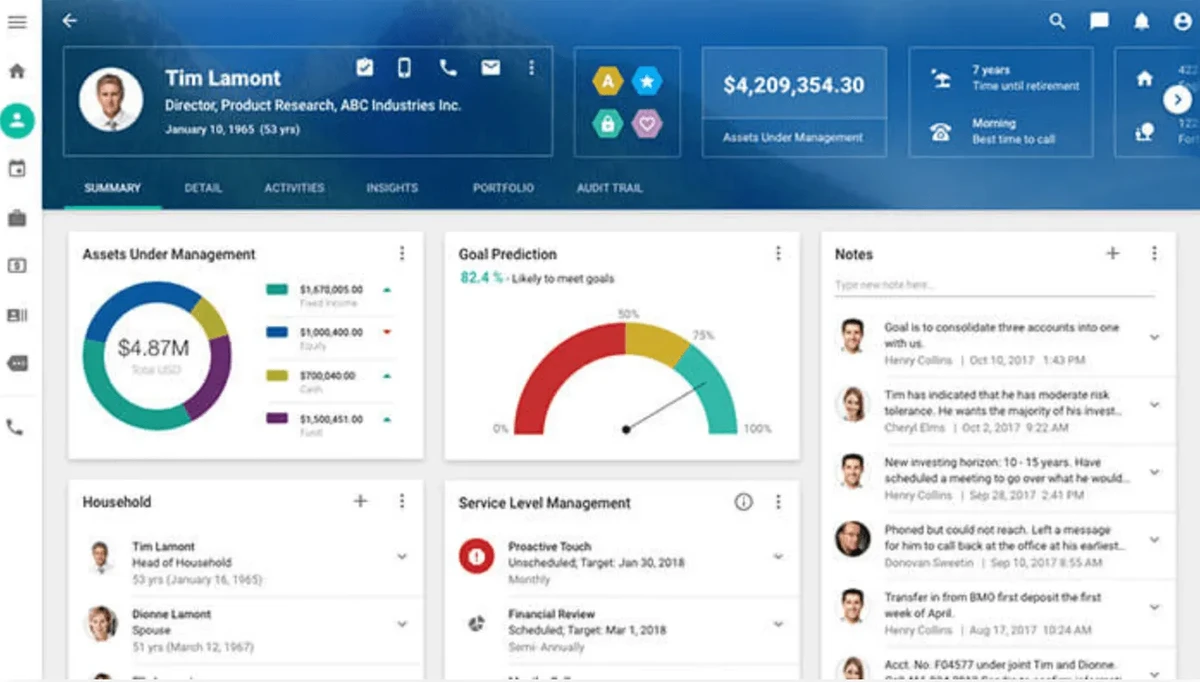
A centralized CRM is not just a database; it is an operational engine that serves different departments in unique ways. When data is siloed, staff spend a disproportionate amount of time searching for information. A specialized CRM like Salesforce Financial Services Cloud provides an intuitive UI with data visualization, allowing different roles to see only what is relevant to their specific tasks.
Shortcut: In many modern CRMs, use the Ctrl + F (or Cmd + F) shortcut to quickly jump to a client’s specific record without navigating through multiple menus.
The Administrative Workflow: Data Entry & Hygiene
For Junior Associates, the CRM is a tool for maintaining order. They use the system to manage the “onboarding” stage of a client’s journey. Using a Wealthbox drag-and-drop interface, they can move prospects through the pipeline in the “Opportunities” menu. Their primary goal is ensuring that every field—from phone numbers to beneficiary details—is accurate. Without this foundation, the entire firm’s data integrity collapses.
The Advisory Workflow: Client Insights & Opportunities
Senior Advisors use the CRM to drive revenue and deepen relationships. Instead of looking at raw data, they look at insights. They use data visualization to identify “wealth shifts”—such as a client receiving an inheritance or a change in employment status. This allows them to reach out proactively rather than reactively. For these users, the CRM should act as a “second brain” that prompts them with the right client insight at the right time.
The Compliance Workflow: Oversight & Reporting
Compliance Officers utilize the CRM as a defensive shield. They do not spend time on data entry; instead, they spend time on oversight. They run reports to ensure that all client communications are logged and that no unrecorded advice has been given. By using the centralized audit trails, they can quickly verify that the firm is meeting all SEC and FINRA regulatory requirements without having to manually inspect every individual email or note.
FAQ
Can I use a general CRM like HubSpot for my financial practice?
While HubSpot is effective for sales and marketing, it may lack specialized financial features like portfolio tracking and compliance reporting found in dedicated tools like Wealthbox or Redtail. Using a general CRM often requires significant manual work to bridge the gap between marketing and financial planning.
How does AI improve client service in a CRM?
AI agents can notify advisors of significant life events (e.g., employment changes) and tools like Wealthbox AI Notetaker help prepare for and follow up on client meetings more efficiently. This allows advisors to stay proactive and highly responsive to client needs.
Does frequent communication actually impact client retention?
Yes, 78% of respondents say better communication helps prevent switching, and clients with frequent contact show significantly higher confidence (71%) in their financial plans compared to those with infrequent contact (22%).
Advertisement