Advertisement
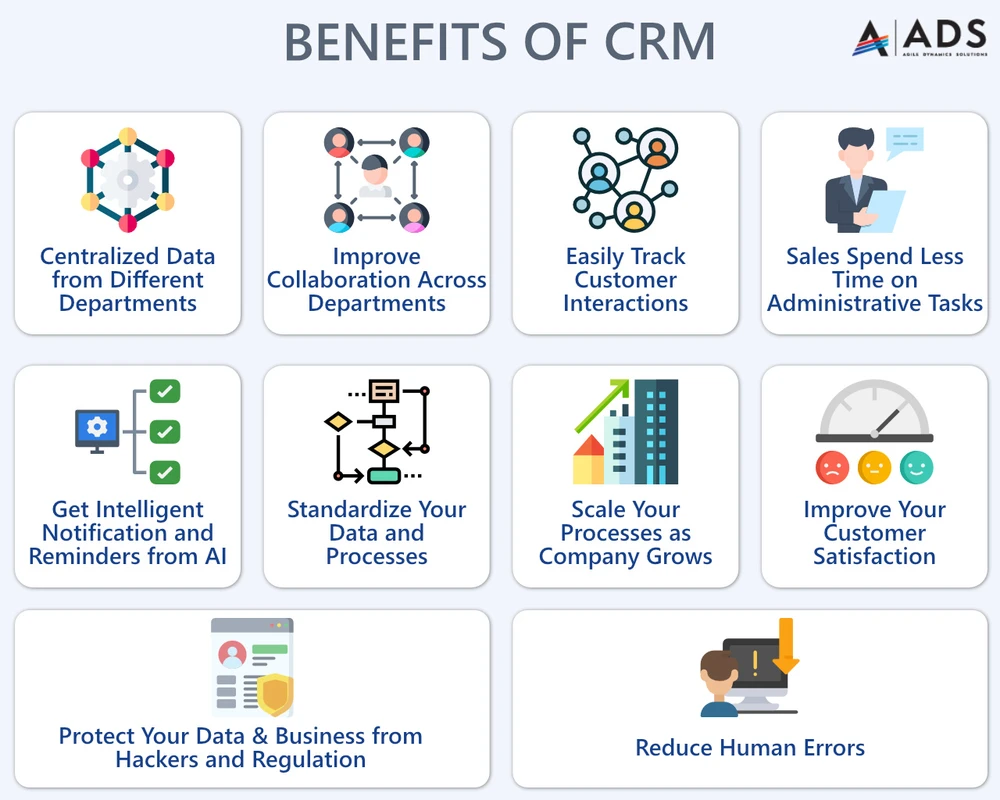
CRM FanzineFaves – CRM software benefits extend beyond simple contact storage to include automated sales workflows, centralized data intelligence, and improved customer retention. By consolidating touchpoints, businesses reduce manual data entry, eliminate information silos, and leverage predictive analytics to drive revenue, ultimately transforming customer relationships into scalable, data-driven assets.
69% of workers spend an hour a day switching between different apps, a productivity drain that CRM integration aims to solve.
Why do CRM implementations often fail despite the promised benefits?
CRM implementations fail primarily due to over-engineering, poor Data Hygiene, and a lack of executive buy-in. Without a focus on user adoption and continuous training, companies often face ‘user revolt’ and the creation of ‘ghost data’ silos that undermine the system’s value.
Advertisement
Many organizations assume that purchasing a license is the final step. In reality, a system becomes a liability if the sales team refuses to use it. When a rep finds the interface too complex, they revert to private spreadsheets. This creates a dangerous failure mode where the CRM becomes a graveyard of outdated information rather than a living database.
The ‘Anti-Benefits’: Risks of poor implementation
Over-engineering is a common pitfall where companies attempt to automate every possible variable before they have mastered basic workflows. If a manager forces a rep to fill out 45 mandatory fields via the “New Lead > Contact Details” path just to log a single phone call, adoption will plummet. This friction often leads to “user revolt,” where the software is viewed as a surveillance tool rather than a productivity aid.
Avoiding the ‘Ghost Data’ Trap
Data hygiene is not a one-time setup but a continuous requirement. Without strict validation rules, a database can quickly accumulate thousands of “ghost” entries. For example, if a user enters “N/A” or “test” into a required “Company Name” field to save time, the entire reporting engine becomes useless for the executive team. A successful implementation requires training that emphasizes why data accuracy matters for their own commission and forecasting accuracy.
How does CRM value evolve as your business scales?
CRM benefits follow a maturity model: Solopreneurs benefit from centralized organization; scaling companies gain through automation and cross-departmental collaboration; and enterprises leverage predictive AI and complex data segmentation to optimize profitability and customer lifetime value.
The utility of a CRM is not static. It shifts from a simple digital Rolodex to a sophisticated engine of business intelligence. As a company grows, the complexity of its data increases, making the CRM the central nervous system of the entire operation.
Stage 1: The Solopreneur (Organization)
At the earliest stage, the primary benefit is the elimination of mental load. Instead of searching through email threads or physical notebooks, the user relies on a centralized repository. Even a lightweight tool allows a single user to track follow-up dates and basic contact history without the risk of forgetting a high-value prospect.
Stage 2: The Scaling Team (Automation)
As a team grows from 1 to 10 or 20 members, the focus shifts to synchronization. This stage is defined by two major shifts:
- Workflow Automation: Using triggers to move a lead from “Discovery” to “Proposal” automatically.
- Cross-Departmental Visibility: Ensuring marketing knows which leads converted and sales knows which leads were nurtured.
At this level, the CRM prevents the common failure of “collision,” where two different reps accidentally call the same prospect because they lacked visibility into the shared pipeline.
Stage 3: The Enterprise (Predictive Intelligence)
Large-scale enterprises use the CRM to identify profitable versus non-profitable customer segments. By analyzing thousands of data points, they can determine that a specific industry segment has a 25% higher lifetime value (LTV) than others. They move from reacting to the past to predicting the future using advanced segmentation and AI-driven forecasting.
When should you switch from a spreadsheet to a CRM?
Switch to a CRM when the cost of manual data entry errors and ‘app-switching fatigue’ exceeds the subscription cost, or when your team size requires multi-user collaboration and automated data validation that spreadsheets cannot provide.
Many founders believe they can manage a growing pipeline with a Google Sheet or Excel file indefinitely. However, spreadsheets are inherently “flat” and lack the relational intelligence required for complex sales. Once you have more than two people editing the same data, the risk of version control errors and accidental deletions becomes a significant operational threat.
Feature |
Spreadsheet |
Lightweight CRM |
Enterprise CRM |
|---|---|---|---|
Data Integrity |
Low (Manual Entry) |
Medium (Validation Rules) |
High (Automated Hygiene) |
Automation |
None/Minimal |
Basic Workflows |
Advanced AI/Triggers |
User Capacity |
Limited/Conflict-prone |
Multi-user Sync |
Massive/Hierarchical |
Complexity/Cost |
Zero/Low |
Moderate |
High |
The transition should be driven by the “Spreadsheet Threshold”—the moment when the time lost to manual updates and errors outweighs the monthly SaaS fee. If your team spends 5 hours a week just cleaning up a spreadsheet, that is 20 hours a month of wasted high-value labor.
Calculating the Cost of Manual Errors
A single error in a lead’s email address or a missed follow-up due to a broken spreadsheet formula can result in the loss of a $10,000 contract. When you calculate the “Cost of Inaction,” the CRM often pays for itself within the first quarter of implementation.
How do mobile-first CRMs empower field sales teams?
Mobile CRMs benefit field teams by providing real-time access to customer history, geolocation-based routing, and voice-to-text logging. This ensures that data is captured immediately after a meeting, preventing the ‘data decay’ common with delayed manual entry.
For the “Mobile Sales Rep” persona, the CRM is not a desktop application but a pocket-sized assistant. The biggest challenge for field workers is “data decay”—the phenomenon where details of a meeting are forgotten or misremembered if they are not logged immediately. A mobile-first approach solves this by allowing data entry at the point of contact.
Voice-to-Text and Offline Mode
Modern mobile CRMs allow reps to use voice-to-text to log meeting notes while walking back to their vehicle. This is significantly faster than typing on a small screen. Furthermore, robust cloud-based CRMs offer an “Offline Mode,” which ensures that if a rep is in a basement or a remote area with no signal, they can still access client files and sync their updates once they regain connectivity.
Geolocation and Real-time Updates
Field teams benefit from geolocation features that can suggest the next closest client to visit, optimizing travel time. By using the “Map View” within the mobile app, a rep can visualize their entire territory and identify clusters of high-priority leads, turning a chaotic driving route into a strategic sales tour.
What are the core operational benefits of CRM integration?
Core benefits include a single source of truth for customer data, automated task management, and seamless cross-departmental communication. This integration allows support agents to pass upsell opportunities directly to sales, maximizing the customer lifetime value.
A CRM should not exist as an island. Its true power is unlocked when it is integrated into the rest of the company’s tech stack, such as email, marketing automation, and customer support tools. This creates a unified view of the customer journey, from the first marketing click to the final support ticket.
Breaking Down Departmental Silos
Integration allows for seamless handoffs between teams. For example, a support agent can identify that a client is struggling with a specific feature and, instead of just closing the ticket, can use a command like “send note to sales” to trigger a notification for an account manager. This turns a potential churn risk into a conversation about advanced features or upgrades.
Automating the Mundane
Operational efficiency is gained by removing the “human middleman” from repetitive tasks. Instead of a manager manually checking if a lead was called, the CRM can handle the following automatically:
- Assigning new leads to specific reps based on territory.
- Sending automated “Thank You” emails after a demo is completed.
- Updating deal stages when a contract is digitally signed via integration.
- Creating follow-up tasks for reps when a lead has been inactive for 48 hours.
FAQ
How much does a CRM actually cost beyond the subscription?
Total Cost of Ownership (TCO) includes much more than the monthly per-user fee. You must budget for data migration from old systems, data cleaning services, administrative overhead for managing the system, and the initial cost of staff training to ensure adoption.
Can AI in CRM lead to inaccurate data?
Yes, AI can suffer from “hallucinations” or rely on poor-quality input data. While AI can summarize meetings or predict churn, it is critical to maintain human verification for high-stakes decisions to ensure that AI-driven insights are based on factual, validated customer interactions.
How does a CRM help with GDPR compliance?
A CRM centralizes all personal data, making it easier to manage “Right to be Forgotten” requests. It allows for automated permission management and provides an audit trail of how and when customer data was accessed, which is essential for meeting strict regulatory standards.
Advertisement